
Breakfast at six, lunch at eleven – the screen switches by itself. Digital signage for restaurants, cafés and bakeries
Breakfast in the morning, lunch from eleven, cake in the afternoon: in cafés, bakeries and restaurants, the offer changes several times a day. With modsi, you prepare a playlist for each time of day – the screen switches by itself, even when nobody has time to do it.
Access by request · billed by invoice and bank transfer, monthly or yearly
Offers at the right time
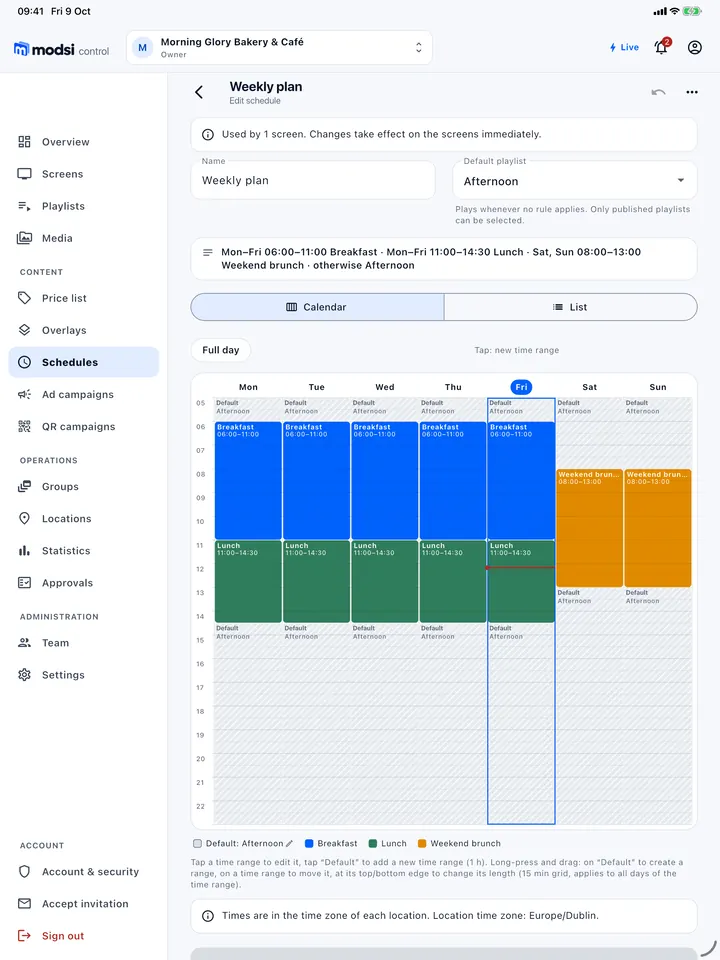
Each weekday and time gets its own playlist, in the location’s time zone – the players switch on the minute, even without internet.
More details: Offers at the right time
A schedule defines which playlist runs by weekday and time of day – for example Monday to Friday 06:00–11:00 “Breakfast”, 11:00–14:30 “Lunch”, “Brunch” at weekends – plus a default playlist for all other times. The times apply in the time zone of each location.
Players download all playlists in the schedule in advance and switch on the minute – even if the internet happens to be down. A manual change applies until the next scheduled one. Schedules are included in all plans.
- BreakfastMon–Fri
- LunchMon–Fri
- Afternoon (default)daily
- BrunchSat–Sun
Lunch, prices and Wi-Fi from one source
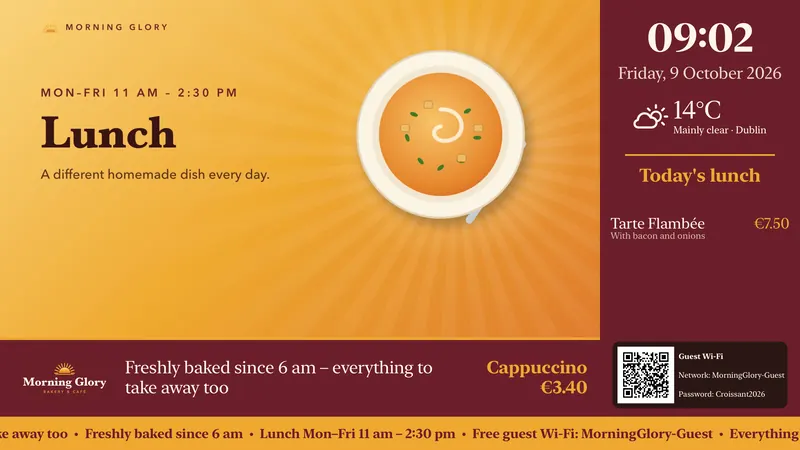
Dishes and prices come from the price list; the “Menu” widget shows today’s dishes, next to the clock, weather and guest Wi-Fi.
More details: Lunch, prices and Wi-Fi from one source
You maintain dishes and prices in the price list. For each dish you set the weekdays on which it is offered and add a short description. The “Menu” widget then shows today’s dishes in an overlay or a slide and changes over by itself at midnight.
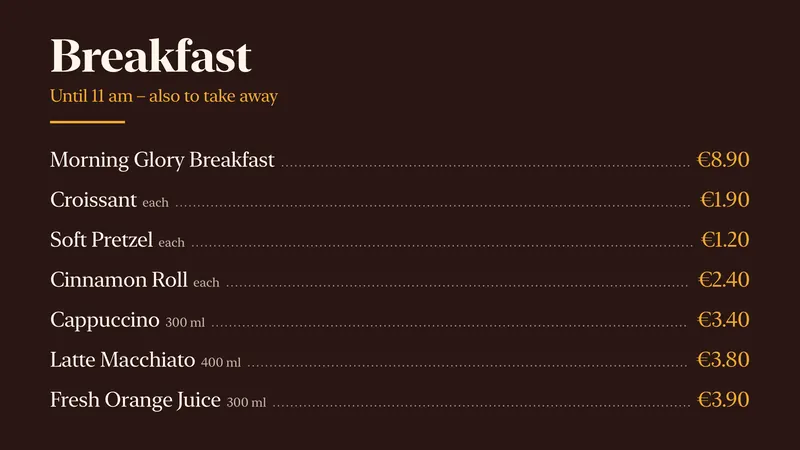
Next to it there is room for the clock, the weather for the location, a ticker and the QR code for the guest Wi-Fi. The “Breakfast” price board is a slide from the same price list – change a price and every screen follows.
Layouts with several zones: Business plan and above
Dishes, prices, daily specials
Take a photo of the dish of the day with your smartphone and upload it from the mobile app straight into the playlist. modsi automatically converts videos into a uniform MP4 that plays on all players. For images you set the display duration, and the playlist plays in a loop.
For an offer without a photo, a slide is enough: templates such as “Offer of the week” or “Opening hours” with your logo and colours, in landscape and portrait. With “valid until”, a promotion disappears by itself at the chosen time.
One screen behind the counter – or several
Behind the counter
A TV with Apple TV or Android TV shows the current offer – in portrait too.
More details: Behind the counter
A TV with Apple TV or Android TV shows the current offer. modsi also supports screens mounted in portrait orientation: you set the orientation per screen, and playlists and overlays are available in portrait format.
Several screens side by sideBusiness and above
Groups start and skip a playlist on all screens at once, almost in sync.
More details: Several screens side by side
Screen groups start, pause and skip a playlist on all devices at once. On the same network they run almost in sync – usually with well under a quarter of a second of deviation. This is not a frame-accurate video wall.
Several branches
Each branch is a location; a publication goes to all of them or just one.
More details: Several branches
Each branch is a location with its own screens. A publication goes to all branches or just one; store staff control the screens on site but do not change prices.
Sold out? Skip the item
- Screens in operation
Pause, play and next item remotely – and you can see whether the command has arrived.
More details: Screens in operation
You control playback from modsi control or the mobile app: pause, play, next item – and see whether the command has arrived. For each screen, modsi shows whether it is online, which publication is actually playing and whether the player is reporting an error.
- How often did the daily special play?
The playback statistics count per media item and screen by day, week, month or year, with CSV export. These are plays, not guests: modsi cannot know whether anyone was watching.
What you should know
- There is no connection to the till system; you maintain dishes and prices in the price list.
- There is no dedicated allergen labelling – you write notes into the dish description or into a slide.
- modsi does not switch the TV on or off; outside operating hours the player shows a black screen. Volume and starting the app automatically depend on the device.
Access to modsi is set up on request. Prices per screen are shown on the pricing page; the Apple TV, Android TV and web player page explains which devices are suitable. modsi is used in a similar way in retail.
Frequently asked questions from cafés, bakeries and restaurants
Your question isn’t here? Write to us – we’ll reply by email.
Can modsi switch the TV on and off?
Not directly. With operating hours you define for each screen when it runs; outside these hours the player shows a black image and stops playback. On Android TV there is also an experimental standby in which the device sleeps and wakes up at the switch-on time – whether the TV switches off completely depends on the device. Volume or starting the app automatically after switching on are not part of the product. If a player hangs, restart it remotely. For the web player, you set up kiosk mode, autostart and sleep settings on the computer itself.
Can I show different content in the morning and evening?
Yes, with schedules. You create rules by weekday and time of day – for example Mon–Fri 06:00–11:00 “Breakfast”, 17:00–20:00 “After work” – and a default playlist for all other times. You assign the schedule to a screen or a group. The players switch on the minute, even if the internet happens to be down, because they download all playlists in the schedule in advance. Schedules are included in all plans.
Can I show the time and weather?
Yes. In the overlay editor you add widgets as layers: clock, weather, ticker, QR code, countdown and events. The clock shows the time and date in the location’s time zone. For the weather, you enter a town for the location; the server fetches the data every 15 minutes and the player shows current values or three days. Ticker headlines come from an RSS feed, events from an ICS calendar address.
Can I show several pieces of content on one screen at the same time?
Yes, with layouts. In the overlay editor you switch on “Main video in a section”, define the area for the main video and add up to four zones, each playing its own playlist of images or videos – muted, looped and independently of the main video. A ticker at the bottom and a background colour complete the layout. Templates such as “Video left, zone right, ticker at the bottom” are included. Layouts with multiple zones are available from the Business plan.
Can I change prices centrally and show content without video?
Yes. In the price list you maintain products with price, unit and category. Overlays and slides use them via placeholders in texts, via a video linked to a product or via the price board with several lines. If you change a price, modsi automatically republishes the affected playlists. Slides are pages without a video file – for example “Offer of the week” with a price board or “Opening hours” – and run in playlists like images. Both are included in all plans.
Can I show a menu or the guest Wi-Fi?
Yes. In the price list you enter the weekdays and a description for each dish; the “Menu” widget then shows the day’s dishes or the whole week, for example with the “Lunch menu (week)” slide template. For the guest Wi-Fi, you enter the network name and password in the “Guest Wi-Fi” widget – guests connect via QR code. The “Image gallery” cycles through the images in a media folder. Everything is included in all plans.
Tomorrow morning, breakfast is already on screen.
Create two playlists and a schedule – the screen behind the counter then switches on the minute.
Access by request · billed by invoice and bank transfer, monthly or yearly